 |
| Click image to enlarge. |

Wednesday, January 22, 2014
The Word Is Love
This one is for the Choose A Word challenge at Three Muses.
The challenge was to pick a word and illustrate it in journal form, so I made up a scene where I am pasting into a fictitious journal.

Sunday, January 19, 2014
High Noon
Okay, I'm back! For those of you who suspected I may have fallen of the edge of the world, I'm back again. 2013 was a tumultuous year for me, with a whirlwind of challenging events. Halfway through my Dad died, and also two dear aunts followed in quick succession.
I got a newer Mac recently, but to my disappointment found that my old version of Photoshop is not compatible, tried out the monthly subscription to the Adobe cloud version, but I wasn't really impressed. I have the latest version of Photoshop Elements, but it is lacking some of the cool features that even my ancient version of regular Photoshop offers. So, I'm chugging along on my old Mac in the back to create my digital art and then surfing at high speeds on my new pooter.
Well, here is my first challenge in months, which is the Three Muses challenge, Still Life.
Naturally, I couldn't be content with fruit in a bowl and a bouquet of roses for a still life.
Please leave a comment and let me know you haven't forgotten me.
I got a newer Mac recently, but to my disappointment found that my old version of Photoshop is not compatible, tried out the monthly subscription to the Adobe cloud version, but I wasn't really impressed. I have the latest version of Photoshop Elements, but it is lacking some of the cool features that even my ancient version of regular Photoshop offers. So, I'm chugging along on my old Mac in the back to create my digital art and then surfing at high speeds on my new pooter.
Well, here is my first challenge in months, which is the Three Muses challenge, Still Life.
 |
| Click image to enlarge. |
Please leave a comment and let me know you haven't forgotten me.
Thursday, April 18, 2013

Tuesday, April 9, 2013
Ball of Confusion
This is for the Written Word challenge at Three Muses.
I went from thoughts of newspaper clippings to news in general, and pondered how we get over-saturated by bad news these days. I don't have newspapers lying around the house, so I started collecting terrible news headlines online and kept dropping them into layers (after a bit of formatting). Then I spherized them (spell-check doesn't like that word) and laid them over a globe. Then I did some swirly things behind it.
All the while, I had the old Temptations song "Ball of Confusion" running through my head. (You youngsters should look it up in YouTube--great song.) We were pretty pessimistic about the state of the world in those days. People still carry on as if the world is about to end. Did I mention we banned the news channels in our household about a year ago?
 |
| Click image to enlarge. |
All the while, I had the old Temptations song "Ball of Confusion" running through my head. (You youngsters should look it up in YouTube--great song.) We were pretty pessimistic about the state of the world in those days. People still carry on as if the world is about to end. Did I mention we banned the news channels in our household about a year ago?
Monday, April 8, 2013
Botanical
This is for the Botanical challenge at Take a Word.
The word botanical makes me think of those detailed drawings of leaves and plants. I was going for a somewhat whimsical look here. I wanted a leaf that still looked like a leaf, but also so you could see what I see when I look closely at a leaf--a little tree.
I picked a leaf and scanned the back of it where all the veins can be seen. Then I did magical things to it using probably five layers where I carefully separated the veins to color them brown and did some fancy footwork with noise and pixel effects to give them texture and a hint of leaves, and added a shadow to give them depth. I gave each tree a cast shadow, that was set at around 45% transparency. There are probably more than twenty layers in my working copy.
I used a photo I took this morning of a large lawn and played around with it to make it look a little more like a painting.
 |
| Click image to enlarge. |
I picked a leaf and scanned the back of it where all the veins can be seen. Then I did magical things to it using probably five layers where I carefully separated the veins to color them brown and did some fancy footwork with noise and pixel effects to give them texture and a hint of leaves, and added a shadow to give them depth. I gave each tree a cast shadow, that was set at around 45% transparency. There are probably more than twenty layers in my working copy.
I used a photo I took this morning of a large lawn and played around with it to make it look a little more like a painting.
Thursday, April 4, 2013

Tuesday, April 2, 2013
Yellow Moon on the Rise
This is for the Moon challenge at Take a Word.
The globes and stones were digitally created and finished up in Photoshop. The moon is from my brush.
 |
| Click image to enlarge. |
Making a Moon Brush
I think Photoshop is one of those programs that even if you have used it for years, there is always something new to learn. I started using Photoshop at the start of the millennium, but it was only last year that I discovered the magic of brushes. My version of Photoshop is the very ancient CS2 for Mac, but I'm sure most everyone can follow along with me.
Brushes are very handy for anything monotone that you use a lot, or for something that repeats on your work. I've created brushes for the moon, trees, stars, shells, pearls, and one I use to trim my clouds. (Yes, you can use brushes with the eraser too.)
So, here's how I did the moon:

First of all, I found a picture of the moon at the NASA site and I trimmed away the black space and left the background transparent. Then I reversed the image. Since the moon is white against a dark background, this is a necessary step, unless you want your brush to come out as a negative moon. I also lightened it, because the outer space pictures have more contrast than what we see here on earth.
The next step was to choose define brush preset which is located in the edit menu.
It will ask you to name the brush, and then the brush is created. It appear with your preset brushes. Now you can stamp away with your new brush. You can make it bigger, smaller, colored, or change the transparency. To toggle the size quickly, use the [ and the ] keys.
There are numerous tutorials on the web that also teach about brushes. Just google away and you will find them.
Brushes are very handy for anything monotone that you use a lot, or for something that repeats on your work. I've created brushes for the moon, trees, stars, shells, pearls, and one I use to trim my clouds. (Yes, you can use brushes with the eraser too.)
So, here's how I did the moon:

First of all, I found a picture of the moon at the NASA site and I trimmed away the black space and left the background transparent. Then I reversed the image. Since the moon is white against a dark background, this is a necessary step, unless you want your brush to come out as a negative moon. I also lightened it, because the outer space pictures have more contrast than what we see here on earth.
 |
| Click image to enlarge. |
 |
| Click image to enlarge. |
There are numerous tutorials on the web that also teach about brushes. Just google away and you will find them.
Saturday, March 30, 2013
Seeds of Wisdom
This one is for the Seeds challenge at Inspiration Avenue.
For this one I created the seeds and the sprouts in Illustrator first. I thought about sprouting some real seeds, but I didn't want to wait that long. The moon is a brush that I created. The cloud is from a photo. The statue is from a very old photo of a statue in an art museum. The yellow flowers were growing in my garden.
 |
| Click image to enlarge. |
Wednesday, March 27, 2013
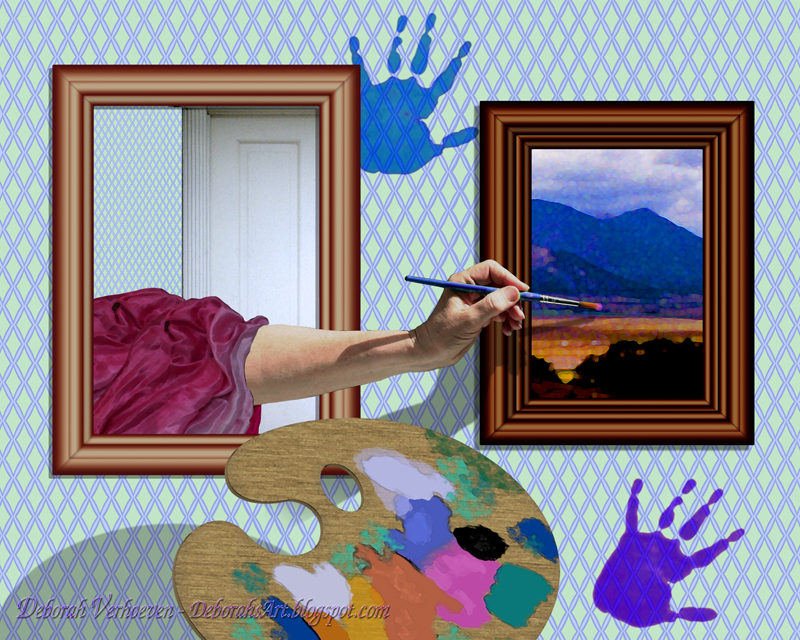
Painterly
This is for the Out of Bounds challenge at Three Muses.
The frames were created in Photoshop. The painting on the right is an old photo that I applied artistic filters too. The wallpaper was created in Adobe Illustrator. I also created the palette in Illustrator and finished it up in Photoshop.
 |
| Click image to enlarge. |
Monday, March 25, 2013
It Looks Like Rain
This is for the Umbrella challenge at Take a Word.
I took my black umbrella outside to photograph it, but between the crazy wind and the fact that it was partially broken anyhow, I realized I had to make one from scratch. I did so in my trusty old Macromedia Freehand. I should be using Illustrator, but I'm faster in Freehand. The clouds, and scenery are from my photos. The moon is a brush I created, and the rain drops are recycled from a photo I took of a clear marble. Yes, that's my dainty little hand.
 |
| Click image to enlarge. |
Sunday, March 24, 2013

Subscribe to:
Posts (Atom)
